Guitar Chord Generator
Learn Chords Fingerings, Note Names and Intervals
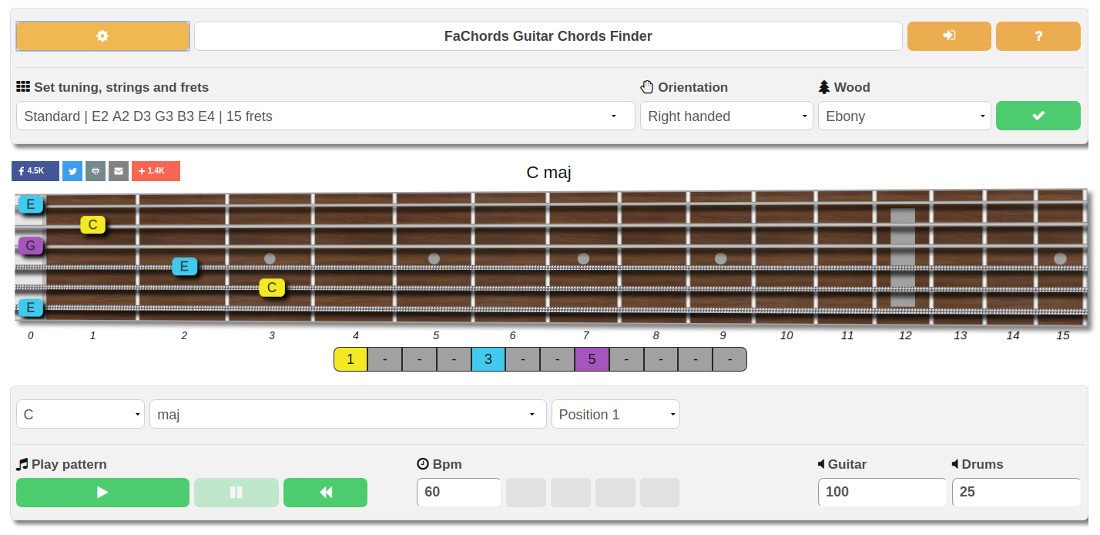
Welcome to FaChords Guitar Chord Generator! This tool will help you learn hundreds of chords all along the fretboard.
The chords generator shows you the fingering for a chord , and plays an arpeggio of the shape, so you can play along with your guitar and check if your fingers placement is correct.
For each chord, several fretboard positions are presented, and for each shape the tool displays finger positions, note names and intervals that compose the chord.
This runs online in the browser : this means that you don't have to download or install anything.
Just click on the launch button and you can enjoy the software directly on your browser, like a standard webpage (so the tool works well on Windows, Apple, Linux or Android devices)
Like all the guitar learning software that this site provides, left-handed guitar players can switch the visualization of the fretboard.
How The Chord Generator Works
 The chord generator is really simple: to learn the fingerings of a chord, you do:
- Select the root name of the chord (for example C, G, A or any other note)
- Select the quality of the chord (major, minor, diminished, dominant or another among more than 50 different types).
- Select the fretboard position on which you want the chord to be shown. Several positions are available: open strings, bar shapes, middle of the fretboard, or higher frets.
The tool will show the chord shapes : You don't need to read any music scores or guitar tabs, the tones composing the chord are highlighted on the guitar neck.
Available Chord Types
Plenty of chord qualities are available: from the common major, minor or dominant forms, to ninth dominants or full diminished structures, and many more.
Just play around a bit with the tool and you'll discover new sounds and flavors.
Intervals Color Mapping And Chord Structure
For those who want to go beyond raw chord shapes memorization, this chord generator has one unique feature that shows you the structure of the intervals creating the chord , also using color mapping.
This helps you understand how chords are created , improving your music theory knowledge.
In the following, you find some simple examples:
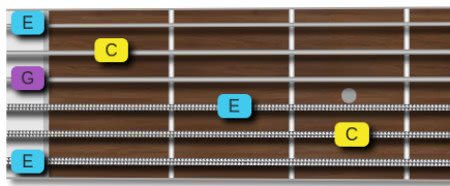 Let's take a major chord: we know that a
major chord
is composed of the root, the major
third and the perfect fifth.
Let's take a major chord: we know that a
major chord
is composed of the root, the major
third and the perfect fifth.
Note that the root is shown in yellow, the third in cyan and the fifth in purple.
The tones of the chord are shown on the fretboard with these colors, so you can identify at a glance what's the root, the third and the fifth!

This is the structure of a minor chord : root (yellow), minor third (green), and fifth (purple)

Finally, here below the structure of a dominant chord : root in yellow, major third in cyan, fifth in purple and the minor seventh in orange.

If you are interested in this kind of chord structure visualization, check out the Guitar chord formulas chart .
Sound Playback

The chord generator interface provides audio playback controls : you can start and pause the playback, set the bpm speed, and regulate the volume of the guitar and the drums (that acts as a metronome).
The tones are played one after the another, arpeggiating the chord , so you can play along the tool and carefully check if each finger is placed correctly, without buzzing or unwanted muted strings
Other Settings

This online software has some settings that can be useful for you:
- You can set the visualization of the fretboard with a left-handed layout
-
Alternate tunings are available
.
However, as it's really time-consuming to shows all the chord shapes for all the tunings, in case of no-standard tunings, the tool shows the tones composing the selected chord on all the fretboard.
It's up to you decide what frets, and thus which shape, to play
This last part concludes our introduction to our guitar chords learning software.
The best way to understand how it works is to launch it and to play with it.
And don't forget to have a look at the other guitar learning software
The interface is really easy to use and you'll find yourself experimenting with new chords in no time.
If you have questions, doubts, or suggestions for new features , please send us a message or drop a line in the comments section below the tool.
Further resources to help you learn chords
- If you prefer a dictionary instead of an online app, you might find useful our guitar chords library . It contains the same chords that you can find on the tool, on a simple webpage.
- You can also download a pdf to print out. Be sure to download our guitar chords pdf chart .
FAQ
How does the Guitar Chord Generator help me understand music theory, beyond just showing chord shapes?
The generator goes beyond visual memorization by displaying the specific note names and the musical intervals (like root, third, fifth, and seventh) that compose each chord shape. It uses a unique color-mapping system to visually highlight these intervals on the fretboard, helping you understand the underlying structure of chords and how they are built.
What types of guitar chords can I learn and explore with this tool?
The generator offers a wide range of chord qualities, from common major, minor, and dominant forms to more complex structures. You can explore over 50 different types, including various 6ths, 7ths, 9ths, 11ths, 13ths, suspended chords, diminished, augmented, and many more, allowing you to discover new sounds and expand your chord vocabulary.
How does the audio playback feature assist in learning new chord fingerings?
The tool provides audio playback that arpeggiates the selected chord, playing each note individually. This allows you to play along with your guitar, carefully checking your finger placement for each string. You can ensure that each note rings clearly without buzzing or muted strings, and you can adjust the tempo (BPM) and volume for optimal practice.
Can I use the Chord Generator if I play a left-handed guitar or use alternate tunings?
Yes, the software accommodates left-handed players with a dedicated layout option for the fretboard visualization. For alternate tunings, the tool will display all the notes composing the selected chord across the entire fretboard. While it won't suggest specific fingerings for non-standard tunings, it empowers you to choose the most suitable chord shapes based on the highlighted notes.
Why are the notes on the fretboard displayed in different colors when a chord is shown?
The different colors represent the musical intervals within the chord. For instance, the root note might be yellow, the third cyan or green (depending on whether it's major or minor), and the fifth purple. This color-coding is a unique feature designed to help you quickly identify the harmonic function of each note in the chord, deepening your understanding of chord construction.
Do I need to download or install any software to use the Guitar Chord Generator?
No, the Guitar Chord Generator runs entirely online in your web browser. You don't need to download or install anything, making it accessible directly from any device (Windows, Apple, Linux, or Android) with an internet connection, just like a standard webpage.