Chord Analyzer | What Guitar Chord Is This?
Interactive Tool To Identify Chords On Guitar
Often when we are learning guitar chords, we use a chord dictionary and directly look it up.
However there are times when you may be playing the guitar and realize that you have a chord shape that sounds good, but you don't know what it is!
Whether you are trying to reverse engineer a chord or find something new for improvisation, the Guitar Chord Analyzer will help guide you based on the notes you input!
How to Use The Reverse Guitar Chord Analyzer
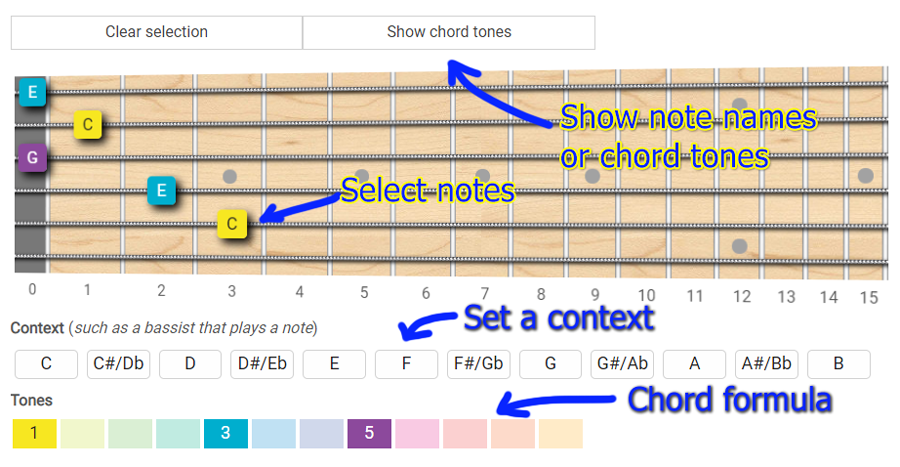
While knowing your music theory and intervals helps, it is possible to use this chord analyzer with very little experience.
It is simply a matter of clicking on the correct fret and copying what you are trying to play on the guitar.
However the shapes you put in can have various names, as there are different methods of chord naming.
So a little theory knowledge can help pinpoint the chord you might be going for.
The lowest note on the fretboard is the most important as that is the root of the chord, if you want more context for that root you can add in a bass note below the empty fretboard.
But first start by putting a well-known chord in like C major, that way you can get an idea of how it works.
For C major we put the root C on the 3rd fret of the 5th string, the 2nd fret of the 4th string, an open 3rd string, the 1st fret of the 2nd string, and finally an open 1st string.
Now below we see several chords this can be, the first one is the obvious C major.
The other chords shown could also be potential candidates, depending on what bass note you play.
They could also be different inversions of the C major chord!
How do you know which to use? Well it's all about context.
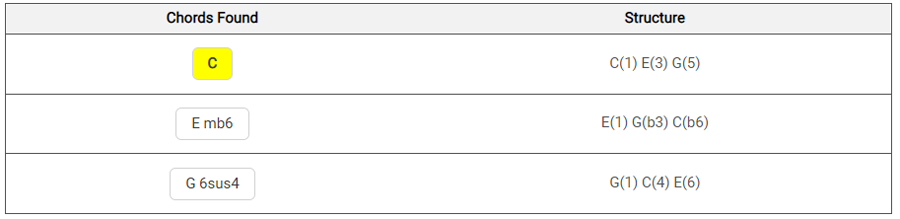
You must look at the other chords you are playing to know which is appropriate.
Most of the time the top chord shown will be the one you want, but as you will eventually discover this is not always the case.
Try some other common major and minor chords to be certain you are using the Chord Analyzer right.
And make sure to always press "show chord tones" that way you get an idea of which intervals exist in the chord (thus helping you learn more theory!).
Now that you are familiar with how it works you can start looking for chords that you don't know!
Perhaps you have a chord you have always played but aren't sure what it's called. Or maybe you just want to experiment and plug various notes in!
Start simple with easy power chords or go wild and use all six strings!
Tips for Using the Tool
There are certain tips and aspects that will make this tool better, while it is fun to just input any notes, it helps to approach the Guitar Chord Analyzer with a purpose.
Make Sure the Chord Is Possible and Useful
Just because we can input a chord in there, doesn't mean it will be playable or useful.
Make sure that your fingers can play what it says.
You may need to barre the strings full or partially in some cases, or you might need to make sure your fingers can make such a stretch.
Any series of notes will make some chord, but that doesn't mean it is suitable for the guitar when it comes to playing.
Building On A Melody
If you happen to have a melody line that you need to build chords around, this tool can make it so much easier.
When the melody moves to a new chord, input that root note in the bass and start adding the other potential notes.
Again the better you are at music theory and intervals, the faster this process will go.
Otherwise there is nothing wrong with experimenting, showing the chord tones, and seeing what happens.
Spice Up Your Chord Progressions!
If you find yourself with a real simple chord progression like the I-IV-V or the common I-V-vi-IV you can use this tool to find some new extensions or intervals to try out.
Instead of sticking to the regular major and minor movements, you can use reverse engineering to find maj7, sus, dim, aug, and so many other chord qualities.
The Chords Found May Not Always Be The Top Pick
Remember there are different ways to name a chord, and while the top pick may often be the case, sometimes it is not.
Even though a particular note may be in the bass it might not be the root, but instead it could be a slash bass chord.
When picking the right name make sure to see if it fits with the other chords you are playing.
Since you are reverse engineering it is up to you to pick the name that best corresponds with the chord progression or sequence you have.
Use The Guitar Chord Finder and Dictionary to Check Your Work
If you find a tough chord that is confusing or not fitting with the rest of your melody or other chords, you can always go to the Guitar Chord Generator and do a quick check.
Even if you know the chord these other reference tools can help you find other positions up and down the fretboard.
These tools work well in conjunction with the Guitar Chord Analyzer.
Use The Context Feature

Right below the fretboard, you can set a note that pretends to be played by another instrument, like a bassist or a piano player.
This helps you simulate a context with a tonic and experiment with chord voicings that do not include the root, as it's up the bassist to play it.
This Tool Also Helps Fretboard Memorization
As your knowledge of intervals and chord names grows this tool will become easier to work with.
In the meantime it can even help with fretboard and chord shape memorization, as you input notes you will soon start to remember which ones go where.
Basically the more you noodle around and experiment, the faster you will memorize the frets.
Just try not to make things too complicated at first, that way it doesn't seem overwhelming!
The Guitar Chord Analyzer is a simple, yet excellent, tool for helping you find the names of chord shapes that you may not know.
It can also help with building on melodies, chord progressions, and simply getting to know the fretboard better.
So whether you have a specific song you are working on, or if you just want to experiment, reverse engineering guitar chords is a great way to increase your skill and music theory knowledge!
Be sure also to check my ebook, Chords Domination | Play Any Chord You Want Across All The Fretboard, if you need a complete reference about chords.
Jump to the Guitar Chords Analyzer
FAQ
Why would I use the Guitar Chord Analyzer if I already know how to look up chords in a dictionary?
The Chord Analyzer's primary purpose is for 'reverse engineering' – identifying the name of a chord shape you've discovered on the fretboard that sounds good, but you don't know what it is. It helps you explore new sounds, build chords around melodies, or find interesting extensions for existing progressions, rather than just looking up known chord names.
How do I start using the Chord Analyzer effectively if I'm new to it?
To get started, try inputting a well-known chord like C major into the analyzer. Click on the frets that correspond to the C major shape on the fretboard (e.g., 3rd fret 5th string, 2nd fret 4th string, open 3rd string, 1st fret 2nd string, open 1st string). This will help you understand how the tool works and how it identifies chords from specific note inputs.
When the Chord Analyzer suggests multiple possible names for a chord shape, how do I know which one is correct?
The 'correct' name often depends on the musical context, such as the surrounding chords in a progression or the bass note being played. While the first option shown is frequently the one you're looking for, sometimes a chord might be an inversion or a slash chord. Consider the overall harmony to determine which name best fits your musical situation.
Is music theory knowledge required to use the Chord Analyzer effectively?
You can use the analyzer with very little music theory knowledge by simply inputting the notes you're playing. However, a basic understanding of theory, intervals, and chord naming methods will significantly enhance your ability to interpret the results, choose the most appropriate chord name, and fully leverage features like 'show chord tones'.
What is the 'context' feature for, and when should I use it?
The 'context' feature allows you to input a bass note that is hypothetically played by another instrument, like a bassist. This is useful for experimenting with chord voicings on the guitar that don't include the root note, as the root is provided externally, offering more flexibility in your chord shapes and sounds.
What should I keep in mind to ensure the chord shapes I input into the analyzer are actually playable on the guitar?
While the analyzer can identify any combination of notes as a chord, it's crucial to consider physical playability. Ensure that the notes you input form a shape that your fingers can comfortably fret, whether it involves barring, specific finger stretches, or open strings. A theoretically valid chord might not always be practical to play on the guitar.